


How Claude for Excel Empowers HR Analysts to Build Reports and Dashboards Without Formulas

Claude for Excel: A Game-Changing Add-in for HR Professionals
According to AIHR: Anthropic has introduced Claude for Excel, an innovative add-in compatible with Excel on web, Windows, and Mac platforms. Designed specifically for HR analysts, this tool enables data analysis without requiring expertise in complex formulas. Claude can interpret all sheets and formulas within a workbook, generate dashboards, simulate scenarios, and fix errors-always seeking user approval before making any changes.
Available to subscribers of Claude’s paid plans such as Pro, Max, Team, and Enterprise, the add-in can be installed via Microsoft AppSource. Claude streamlines HR data management by cleaning datasets, identifying duplicate IDs, standardizing job titles, and formatting dates, making it an invaluable assistant for HR analytics.
Key Benefits and How to Use Claude for Excel
HR specialists can quickly produce reports, test hiring strategies, and create dashboards featuring 3 to 5 critical HR metrics. The add-in allows users to add a dedicated assumptions tab linked to core calculations and run scenario analyses by modifying these assumptions to compare outcomes. To open the Claude panel, users press Ctrl+Option+C on Mac or Ctrl+Alt+C on Windows.
It is important to note that Claude should not be relied upon for final reports without human validation. Analysts must adhere to data security protocols by avoiding uploading personal information without consent and manually reviewing all changes. Key advantages of Claude for HR professionals include:
- Building visual reports without writing formulas;
- Accelerated reporting and workforce planning;
- Better comprehension of others’ spreadsheets;
- Detection and correction of formula errors;
- Running multiple staffing scenarios;
- Assisting in formula creation.
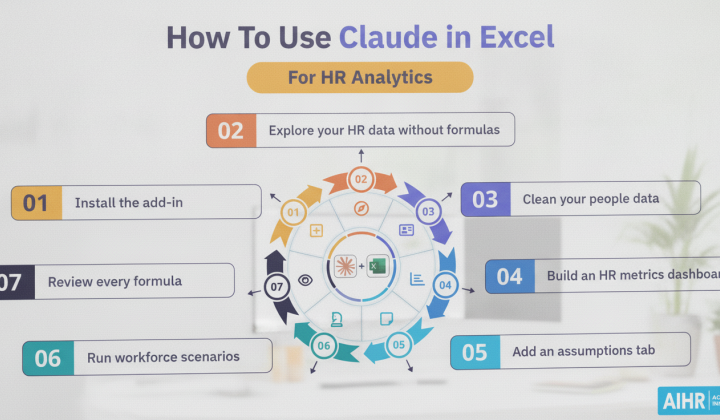
The process of effectively using Claude for HR analytics involves seven main steps:
- Installing the Claude for Excel add-in;
- Exploring HR data without formula knowledge;
- Cleaning and organizing datasets;
- Building dashboards with key HR metrics;
- Adding an assumptions tab for workforce planning;
- Running scenario analyses based on staffing plans;
- Verifying every formula before sharing reports.
As Anthropic representatives explain, “It reads your actual cells, writes the formulas directly, and builds the dashboard inside your spreadsheet. No copy-pasting, no broken formulas from a chatbot that can’t see your data.”
The rollout of Claude for Excel offers HR teams a powerful tool to simplify data analysis without demanding advanced formula skills. By reducing time spent on repetitive tasks, it enables HR professionals to concentrate on strategic priorities like workforce planning and recruitment optimization. In today’s fast-paced labor market, the ability to analyze data swiftly and accurately is essential for effective human resource management.

Read also